
Google My Business Reinstatement Service : Get Your GBP Back Live Fast!
Trusted specialists in Google Business Profile (GBP) and GMB reinstatement, helping businesses worldwide restore suspended listings quickly, accurately, and in full compliance with Google’s latest guidelines and policies.
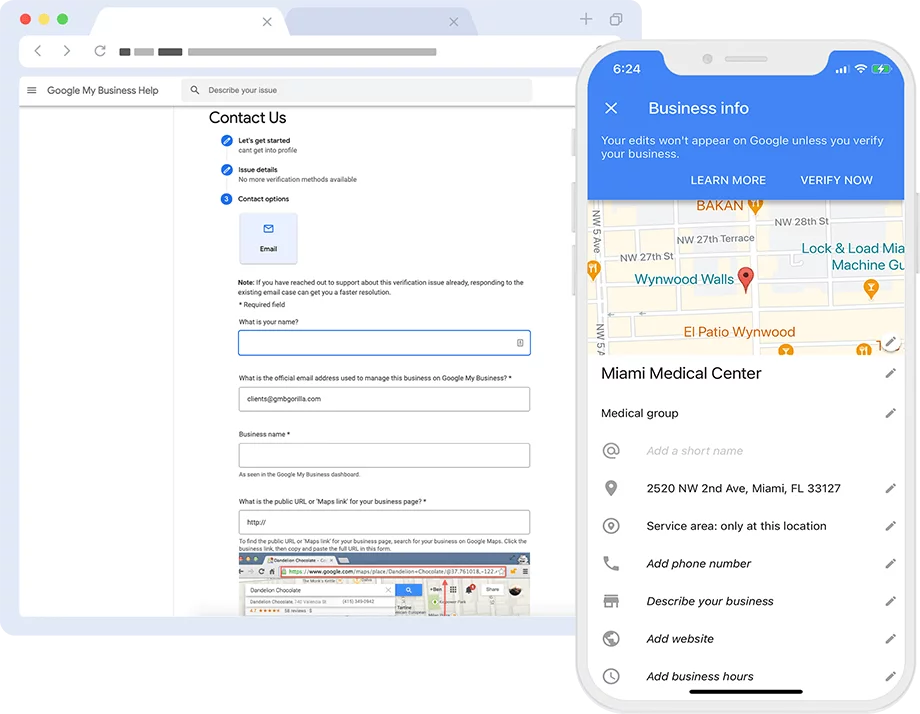
Google Business Profile Reinstatement Service
Google My Business (now called Google Business Profile) is one of the most powerful tools for getting found online, especially by local customers. When people search for services near them, your GMB listing helps you show up on Google Maps and local search results. It displays your business name, location, hours, photos, reviews, and more — all in one place.
However, sometimes Google may suspend or disable your listing. This can happen for several reasons — like having incomplete information, using a virtual address, violating Google’s guidelines, or even because of a competitor’s false report. When this happens, your business disappears from local search and Google Maps, and that can directly affect your leads and sales.
That’s why having an active and verified GMB listing is critical for local SEO and online visibility.
We’ve helped many local businesses successfully reinstate their suspended Google listings. Whether your listing was taken down without warning or due to a specific issue, we know exactly what steps to take — and how to communicate with Google to get your profile back live again.
Google My Business Reinstatement Service – Overview
Our Google My Business Reinstatement Service connects you with a dedicated GBP specialist experienced in navigating Google’s suspension system. Based on proven strategies and years of hands-on experience, we handle the entire reinstatement process—so you don’t have to deal with confusing policies or endless back-and-forth with Google support. Whether you’re based locally or internationally, our team communicates with Google on your behalf via email and other official channels, ensuring your profile gets reviewed and reinstated the right way.
Preparing Your Google Business Profile for Reinstatement
If your Google Business Profile (GBP) has been suspended, we begin by thoroughly auditing your listing based on Google’s current quality guidelines. We identify any policy violations that may have triggered the suspension or caused a previous reinstatement denial. After discussing the findings with you, we make the necessary adjustments (with your consent) to ensure your profile meets compliance—before submitting a professional reinstatement request.
Denied Reinstatement? Don’t Worry, We Can Still Help
If Google has already denied your reinstatement request, you still have options. Our team will review the past correspondence with Google, audit your profile for any unresolved or overlooked violations, and suggest or implement appropriate corrections. We then provide a detailed response for you to submit in your appeal. Important note: if you’re using a virtual office address, you’ll need to update it with a valid physical address or convert to a Service Area Business model to stay compliant.
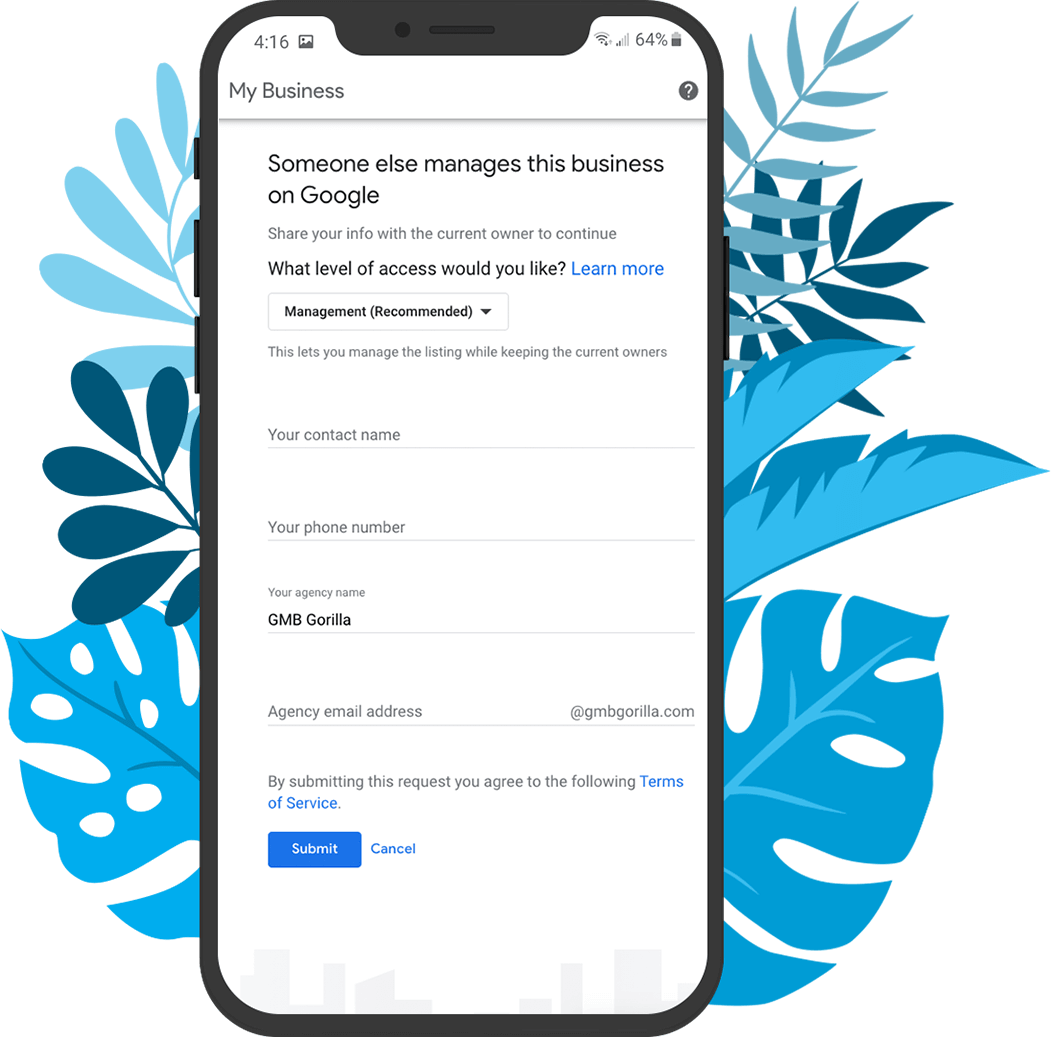
Fix Post-Reinstatement Issues in Your GBP
Just had your GBP reinstated but still noticing problems? We can help optimize and repair your listing after reinstatement. Our experts will audit your profile, highlight remaining issues such as incorrect business categories, poor descriptions, or keyword stuffing, and implement the right changes—always with your approval. Our goal is to not just get your profile back online, but to ensure it’s fully optimized and safe from future suspensions.
How We Help – Our GMB Reinstatement Process
Here’s how the Google My Business reinstatement service works at Digital Sohail:
1. Initial Audit and Diagnosis
We start by reviewing your suspended profile and identifying the exact reason for suspension. Our team checks your profile details, past changes, and whether your listing complies with Google’s policies.
2. Collecting Proper Documentation
Based on the suspension type, we gather and prepare all required documents. This may include utility bills, business licenses, photos of your storefront, signage, or service area proof.
3. Addressing the Suspension Cause
If we find any policy violations or missing info, we correct and optimize your GMB listing before applying for reinstatement. This increases the chances of a successful recovery.
4. Filing the Reinstatement Request
We fill out and submit the Google Business Profile Reinstatement form on your behalf — properly and completely.
5. Communicating with Google Support
If needed, we directly handle communication with Google’s support team to explain your case and respond to any additional requests or questions.
6. Resubmission and Escalation (If Needed)
In rare cases, Google may reject the first attempt. If that happens, we re-evaluate the issue, make further improvements, and escalate the request through the proper channels.
7. Monitoring for Reinstatement
We continuously monitor the status of your profile until it is reinstated. Once restored, your business listing will start appearing again in Google Search and Maps.
GMB Reinstatement Pricing
GMB Reinstatement
200
$200
per Listing
GMB profile review
Filing reinstatement request with Google
All communication handled by our team
Status updates until reinstatement is complete
7-day post-reinstatement support
Why GMB Suspensions Happen
Getting your Google My Business (now called Google Business Profile) suspended can be frustrating, especially when you’re not sure what caused it. Suspensions can happen either manually (by a Google team member) or automatically through Google’s algorithms. In both cases, it can take time and proper steps to get your profile back.
We’ve helped many businesses recover their listings. Here are the most common reasons why a GMB profile gets suspended:
Address or Location Issues
If your business address isn’t clear, matches another business, or uses a virtual or shared space (like a co-working office), Google may flag it. Home-based businesses are also often at risk if not set up correctly.
Service-Area Business Violations
If you’re a service-area business (like a plumber, electrician, or cleaning service) and display your physical address publicly, this goes against Google’s guidelines. These kinds of businesses should hide their address and only list the areas they serve.
Keyword Stuffing in Business Name
Adding extra keywords in your business name (like “Digital Sohail – Best SEO Services in Lahore”) may seem like a smart SEO trick, but it’s a violation. Google only allows your real business name — nothing extra.
Fake or Duplicate Listings
Creating multiple listings for the same business or using fake names/addresses is a major red flag. Google has strong systems to detect these and will suspend the profile immediately if caught.
Third-Party Edits
Sometimes, even if you didn’t do anything wrong, other people can edit your listing — including competitors. If those edits conflict with your business info, Google might automatically suspend the profile to prevent any misinformation.
Many business owners try to fix things themselves but get stuck — especially when filling out the Google Business Reinstatement Form. It’s not as simple as it looks. If the form isn’t filled out correctly or if you miss important details, Google may reject your request.
4 Types of Google Business Profile Suspensions
When your Google Business Profile (previously called Google My Business) gets suspended, it can seriously hurt your local visibility. At Digital Sohail, we help businesses get their listings back up and running. To better understand the process, here are the main types of suspensions and how each one affects your local SEO.
1. Soft Suspension
Your profile is still live — customers can see it on Google Search and Maps — but you can’t make any changes to it. You’ll see a message inside your dashboard saying the listing has been suspended.
Impact on Local SEO:
You’ll still appear in local search results, but you lose control. That means you can’t update business hours, add photos, reply to reviews, or post updates. This can slowly harm your profile’s performance and trust with customers.
2. Hard Suspension
This is the most serious type. Your entire business profile disappears from Google Search and Maps. If someone searches for your business, they won’t find anything.
Impact on Local SEO:
You completely vanish from local search. All your local SEO efforts — reviews, visibility, photos, and rankings — go to waste until the issue is fixed. This can directly affect your calls, foot traffic, and online leads.
3. Ownership Suspensions
This happens when Google believes the current owner or manager of the profile is not authorized to manage it. It may be due to suspicious activity, login from unknown locations, or multiple people managing the same listing.
Impact on Local SEO:
Even if your profile stays visible, the real problem is control. You lose access and can’t manage or update the listing. If someone else gets control, they might post wrong details, affecting customer trust and search performance.
4. Verification Suspensions
Google may suspend your profile if it suspects the information you provided during the verification process is false or incomplete. Sometimes it happens after a recent address, name, or category change.
Impact on Local SEO:
Until you prove your business is real and follows Google’s guidelines, your listing may remain hidden or limited. This slows down your ability to rank in the local 3-pack and hurts your online presence.
Case Studies: Local Service Business Reinstated in 7 Days
Business Type: HVAC Repair Company – Dallas, Texas, USA
Issue: GMB profile suspended for “quality issues” with no clear explanation
Steps Taken:
We audited their GMB profile for compliance issues
Collected proof of business (business license, utility bill, photos of branded van)
Submitted a detailed reinstatement request with supporting documents
Timeline:
Day 1: Suspension received
Day 2: Documentation collected
Day 3: Reinstatement form submitted
Day 7: Business listing reinstated
Outcome:
Business profile went live again
Calls and traffic returned within 24 hours
Business Type: Online Pet Supplies Store – Birmingham, UK
Issue: GMB listing suspended after being flagged as a virtual office
Steps Taken:
Advised client to switch from physical address to service area model
Provided warehouse photos, shipping records, and business registration
Created a short video walkthrough of their packing station and storage area
Timeline:
Day 1: Suspension notice received
Day 3: Business model updated
Day 5: Reinstatement request submitted
Day 10: GMB successfully reinstated
Outcome:
Listing became visible again on Google Search and Maps
Old reviews and ranking fully restored
Why Choose Digital Sohail for GMB Reinstatement?
1. 100% Manual & White-Hat Process
We don’t rely on bots or risky tools. Every reinstatement request is handled manually by our experienced team. We follow a white-hat approach that fully aligns with Google’s guidelines to ensure your listing gets reinstated without further issues.
2. Deep Knowledge of Google’s Policies
Our team understands Google’s GMB policies inside and out. This allows us to spot exactly what went wrong and take the right steps to fix it. We carefully review your account, clean up any violations, and prepare a solid case for reinstatement.
3. Reinstatement Success Stories
We’ve helped hundreds of local businesses across Pakistan and beyond get their suspended listings reinstated. From local shops to service businesses, our proven process works. We’re proud of our track record and happy to share our success stories.
4. Local SEO & GMB Experts
We’re not just reinstatement specialists – we’re local SEO experts too. That means we don’t just help you get your listing back; we help you optimize it for better visibility, higher rankings, and more customer calls.
5. Fast Response Times & Friendly Support
We know that time is money. That’s why we offer quick response times and dedicated support. Whether you have questions or need updates, our team is always ready to assist you through email, WhatsApp, or a quick call.
Risks of DIY Google My Business Reinstatement
Trying to reinstate your Google Business Profile on your own might seem easy, but it often leads to bigger problems. Here are some common mistakes people make when they try to do it themselves:
1. Misfilling the Reinstatement Form
Google’s reinstatement form needs to be filled out carefully. A small error, like choosing the wrong suspension type or providing unclear answers, can delay the process or lead to rejection. Many business owners don’t even know what Google is really asking for.
2. Providing Incorrect or Incomplete Documentation
Google requires very specific documents to prove your business is real. Submitting the wrong documents — or ones that don’t fully meet Google’s standards — can hurt your case. If Google thinks you’re not a legitimate business, they might not give you another chance.
3. Multiple Failed Requests Can Lead to Permanent Suspension
Every time you submit a failed request, your chances of reinstatement go down. If you try too many times with the wrong info, Google may flag your profile permanently, making it much harder or even impossible to bring back.
4. Why Choosing a Trusted Agency Like Digital Sohail Is Safer
Instead of guessing your way through, let experts handle it. We’ve helped many businesses recover their suspended profiles the right way — without delays or unnecessary risks. We know what Google looks for and how to respond professionally. When you work with us, you avoid mistakes and increase your chances of getting reinstated faster.
What Documents Are Required for GMB Reinstatement?
When your business listing gets suspended, Google needs to verify that your business is real and operating at the address provided. As part of our Google My Business Reinstatement Service, we help you gather and submit the right documents to speed up the reinstatement process.
Here’s a list of the most commonly required documents for GMB reinstatement:
Utility Bills
You’ll need to provide a recent utility bill (electricity, water, gas, internet, etc.) that clearly shows your business name and address. This helps Google confirm that your business is active at that location.
Business License or Registration
A valid business license or company registration certificate is often required. It should match the details listed on your Google Business Profile, especially the business name and address.
Street-Level Signage Photos
Take clear pictures showing your business sign placed outside the building. This should be visible from the street and not just printed paper on the door. Signage proves your business physically exists at that address.
Storefront Images
Photos of your storefront — including the entrance, building exterior, and surrounding area — help Google verify that customers can visit your location. These should not be stock photos but real images taken at your business site.
Ownership Proof
Documents like lease agreements, tax papers, or official letters that prove you legally own or rent the property where your business operates can be helpful.
Additional Google Support Documentation
Sometimes, Google may ask for extra information such as a video walkthrough of your office or invoices from vendors. As part of our Google My Business Reinstatement Service, we guide you on how to prepare and submit these quickly and correctly.
Don’t Rush To Submit The Google Business Profile Reinstatement Form
Many business owners, after seeing their Google Business Profile suspended or disabled, act quickly without thinking things through. Some rush to fill out the reinstatement form without understanding the process, while others panic and delete the suspended listing to create a new one.
Both of these steps can lead to bigger problems.
Deleting a profile or submitting a form with errors can result in losing important data—like photos, videos, and customer reviews. The good news is: if your original listing gets reinstated properly, most of your content and reviews usually come back within 72 hours.
That’s why it’s crucial to first review your profile and correct any issues before submitting the reinstatement request. A properly completed form increases your chances of getting your profile back quickly. But if the form is filled out incorrectly, it could delay the process—or worse, lead to rejection.
If you’re not sure how to proceed or need help, we’ve got your back.
At Digital Sohail, we specialize in Google My Business Reinstatement Services. With over 12 years of experience and more than 700 successfully reinstated listings, we know exactly what it takes to restore your profile without risking your reputation. Let us handle the process and get your business back online, where it belongs.
Reinstatement Form Page Link
You will find the Google Business Profile Reinstatement Form on the link below:
https://support.google.com/business/answer/4569145?hl=en&visit_id=638899378463308552-3878572813&rd=1
Reinstatement Request Questions
When you open the reinstatement form, Google will start by asking you a few simple questions to understand your situation.
The very first question you’ll see is:
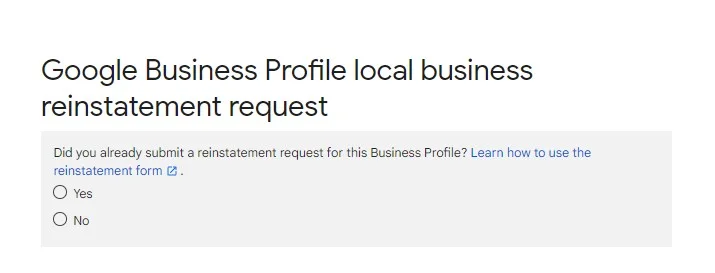
How you answer each question determines the next question.
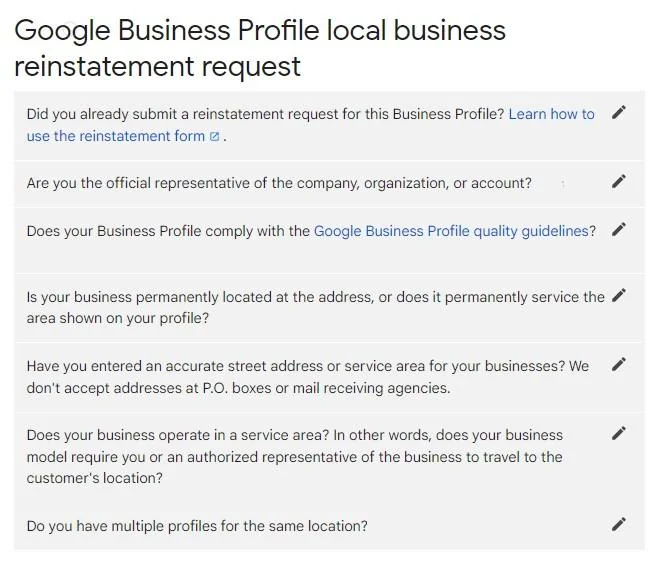
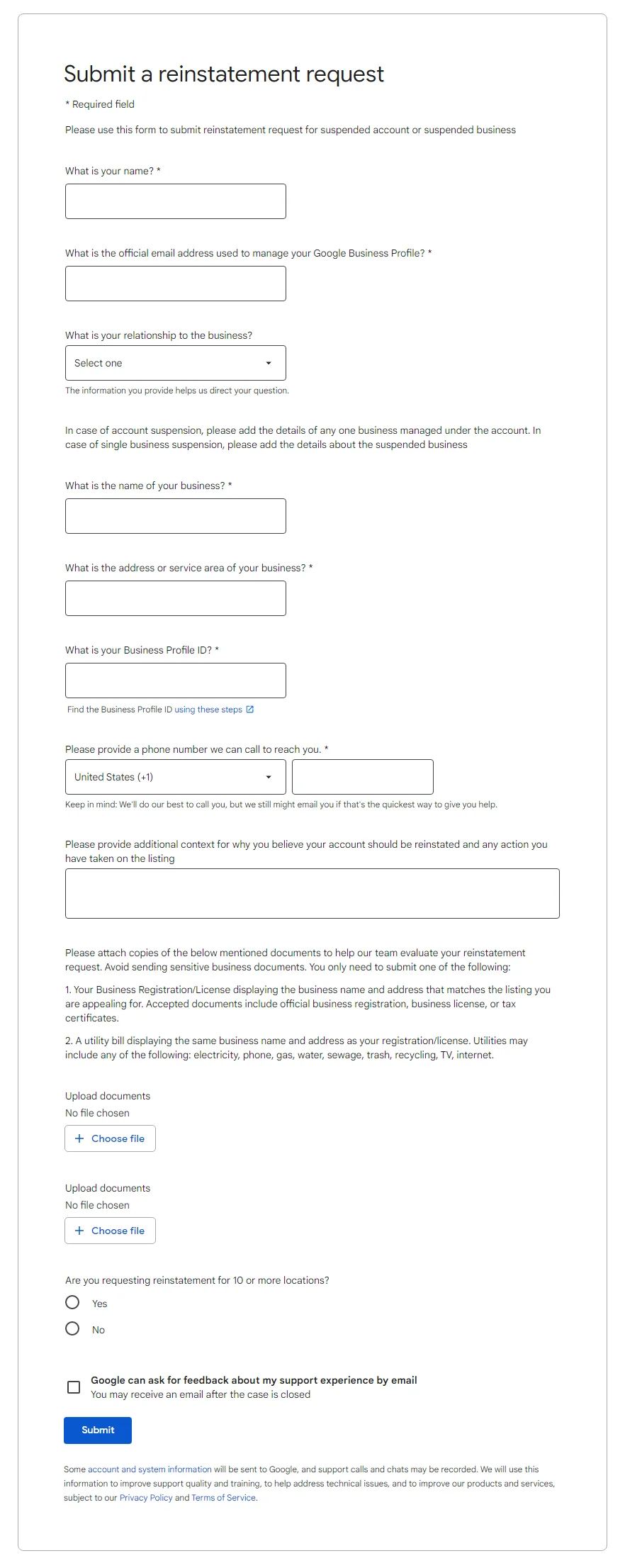
Reinstatement Request Form
After you answered all the questions, the reinstatement request form appears:
Post-Reinstatement Support & Optimization
Getting your Google My Business (GMB) profile reinstated is just the first step. At Digital Sohail, we don’t stop there. After your profile is live again, we provide complete post-reinstatement support to make sure it stays active and fully optimized.
Staying Compliant to Avoid Suspension Again
Many businesses get suspended again because they don’t follow Google’s rules. We help you stay compliant by checking all your business details and making sure they meet Google’s guidelines.
Correct Business Name Guidelines
Your business name must match how it appears in the real world – no extra keywords, locations, or taglines. We make sure your GMB name is clean and approved by Google so you don’t get flagged.
Proper Address Formatting
A lot of GMB suspensions happen because of wrong or confusing address information. We double-check your address format, pin location, and service area settings to make sure everything is clear and correct.
Ongoing GMB Optimization
After reinstatement, we keep your GMB profile active and healthy by:
Adding new posts, photos, and updates regularly
Responding to reviews professionally
Updating business hours and services as needed
Adding new services, products, and FAQs to improve visibility
Who We Help – Ideal Clients
we help all types of businesses get their Google My Business (GMB) profiles reinstated. If your listing got suspended, we’re here to guide you through the reinstatement process.
Here’s who we work with:
Local Service Providers
If you run a salon, clinic, repair shop, or any other local service, we can help bring your listing back.
Ecommerce Stores with Physical Pickup Points
Selling online but have a place where customers collect orders? We help get those listings live again.
Service Area Businesses (SABs)
From plumbers to electricians, if you serve customers at their location, we know how to handle your GMB reinstatement.
Multi-Location Businesses
Got multiple branches and one or more GMB listings suspended? We’ll help restore each of them properly.
GMB Owners Facing Repeated Suspensions
If Google keeps suspending your profile, we’ll find out why and fix it for good.
Industry-Specific GMB Reinstatement Tips
Contractors & Plumbers
Google often suspends profiles for service-area businesses due to inconsistent address details or using PO boxes.
Tip: Make sure your business license, website, and GMB info all match. Always use a physical address and clearly list the areas you serve.
Local SEO Tip: Show service areas and get reviews from local customers for better trust and rankings.
Lawyers & Medical Professionals
Profiles get flagged for using shared office spaces or failing to list practitioners correctly.
Tip: Create separate listings for each licensed professional with their exact name and title. Avoid using marketing language in the business name.
Local SEO Tip: Add detailed services like “Personal Injury Lawyer in Lahore” or “Family Dentist in Karachi” to boost visibility.
Real Estate Agents
Real estate profiles are often removed for overlapping office locations or using branded business names.
Tip: Use your real name as licensed by your real estate board. Add supporting documents like your license and utility bill.
Local SEO Tip: Focus on local keywords like “Real Estate Agent in DHA Karachi” and collect reviews from past clients.
Vape Shops (High Risk)
Vape businesses are high-risk due to Google’s strict product policies. Suspensions are common.
Tip: Don’t mention restricted products in the business name or description. Upload a storefront photo and utility bill for proof.
Local SEO Tip: Stay compliant with Google’s terms and focus on branding instead of product names.
Restaurants & Cafés
Suspensions often happen due to inconsistent hours, menu issues, or duplicate listings.
Tip: Keep your hours updated, avoid keyword stuffing in the business name, and link your menu directly from your website.
Local SEO Tip: Post regular updates, reply to reviews, and upload geo-tagged food photos to improve your local reach.
Alternatives to Reinstatement (If Denied)
Sometimes, even after doing everything right, Google may still deny your reinstatement request. If that happens, here are a few options you can consider:
1. Creating a New Listing: Risks and Considerations
You might think about starting fresh with a new listing, but this comes with risks. If Google sees it as a duplicate or spammy, they may suspend that too. You’ll also lose all your past reviews and local SEO value. Only go this route if you’re sure the old listing won’t be reinstated.
2. Appealing Google’s Decision
If you believe your suspension was a mistake, you can appeal Google’s decision. Provide clear evidence, real business documents, and a professional explanation. Be respectful and honest — one solid appeal is better than many rushed ones.
3. Last-Resort Escalation Methods
If appeals fail, you can try reaching Google support through official forums or social media like Twitter/X (@GoogleMyBiz). You may also hire a professional agency like Digital Sohail that knows how to communicate effectively with Google support teams.
4. Reputation Rebuilding
If you lose your old profile and have to start over, focus on rebuilding your reputation:
Ask loyal customers to leave new reviews.
Share regular posts and updates.
Add photos and complete all business info.
Stay active on your new listing.
With time and effort, you can recover your local presence.
How Long Does GMB Reinstatement Take?
Reinstating a suspended Google My Business (GMB) profile usually takes 3 to 14 business days. In some cases, it can take longer if documents are missing or if there are policy violations.
How GMB Suspension Hurts Your Business
Drop in Search Impressions: Your business disappears from local search.
Loss of Map Visibility: You’re removed from Google Maps.
Brand Trust Issues: Customers can’t find or contact you.
Revenue Loss: Fewer calls, visits, and leads = lost sales
Google My Business Optimization Tips After Reinstatement
Once your GMB is reinstated, follow these quick tips to keep it active and avoid future issues:
Accurate Business Info (NAP): Make sure your name, address, and phone number are 100% correct and match your website.
Post Updates & Offers: Share regular posts about offers, services, or news to stay active and visible.
Add Products/Services: List all your services and products with clear descriptions to help customers understand what you offer.
Manage Reviews: Request reviews from happy customers and respond to all feedback — positive or negative.
Upload Geo-Tagged Photos: Add high-quality photos tagged with your location to boost local visibility.
Use Correct Categories: Choose the most relevant primary and secondary categories for your business.
Common Myths About GMB Reinstatement
Many business owners get confused about how the reinstatement process works. Let’s clear up some common myths:
❌ “It’s automatic after a few days”
Truth: GMB profiles don’t get reinstated automatically. You must submit a formal reinstatement request and provide proper documentation. Waiting it out usually leads nowhere.
❌ “Google doesn’t care about documentation”
Truth: Documentation is one of the most important parts of reinstatement. Google wants to see proof that your business is real and follows their guidelines. Skipping this step can lead to rejection or delays.
❌ “You can pay to speed it up”
Truth: No one — including agencies — can pay Google to make the process faster. Anyone offering a “fast-track” for money is misleading you. What matters is submitting everything correctly the first time.
❌ “Only Google support can fix it”
Truth: While Google has the final say, experienced SEO professionals know how to work with their systems. We understand what Google wants and help you get things right so your listing has the best chance of being restored.
FAQs – Google My Business Reinstatement Service
1. What is GMB reinstatement and why does it matter?
GMB reinstatement is the process of restoring a suspended Google Business Profile. If your listing is suspended, customers can’t find you on Google Maps or Search. Getting it reinstated brings your visibility back.
2. Why was my Google Business Profile suspended?
There could be many reasons — incorrect business info, violations of Google’s guidelines, or missing documentation. We analyze your profile to find out the cause before submitting the Google My Business reinstatement request.
3. What is the Google business reinstatement form?
It’s a form provided by Google where you request reinstatement of your suspended business profile. Filling it out correctly is key. We help prepare and submit the Google business reinstatement form properly to avoid delays.
4. How long does it take to reinstate a suspended Google Business Profile?
It usually takes 3 to 10 business days, depending on Google’s response time. In some cases, it may take longer if more documents are required.
5. Can Digital Sohail help with multiple profile reinstatements?
Yes! We can assist with one or several listings. Whether you’re a chain or managing multiple locations, our Google My Business Reinstatement Service can help.
6. What if Google denies my reinstatement request?
If your first submission is denied, we re-evaluate the case, update your profile, gather stronger documents, and resubmit until we succeed. We don’t give up easily.
7. Is this service similar to what GMB Gorilla offers?
Yes, our process follows expert-level standards just like GMB Gorilla, but we provide more personal, locally-focused support for businesses in Pakistan and the UAE.
8. Will you communicate with Google on my behalf?
Absolutely. We manage all communication with Google during the GMB reinstatement process so you don’t have to stress about follow-ups or technical replies.
9. How do I know if I need a Google My Business reinstatement?
If your listing is missing from Google search or shows as “suspended” in your dashboard, you need reinstatement. We offer a free review to confirm it.
10. Can I prevent my listing from being suspended again?
Yes. After we reinstate your profile, we give you clear guidance to avoid future suspensions. We also offer monthly Local SEO and GMB profile management.